One plan, everything included·Team $5/user/month·Business on custom pricing
Remote teams
Trakkar logo

How to track remote employees in one tool

See who's working, where, and on what, with optional screenshots, WFH, and attendance. Trakkar Team (₹120/user) replaces monitoring, HR, and billing tools.

WFH · attendance · optional screenshots · activity

Trying to track remote employees falls apart when attendance lives in one app, project time in another, and approvals in email. Indian agencies also need WFH requests, shift policies, and INR payroll exports without buying Hubstaff, a separate HR tool, and an invoicing product. Trakkar combines live attendance, optional screenshot monitoring, and billable time on the same platform your finance team already uses for GST invoices.

Step by step

How it works in Trakkar

A practical workflow your team can run every billing cycle.

  1. Publish shift and WFH policies — Set shift start times, grace minutes, and whether WFH needs manager approval. Employees see the policy on their attendance screen before they clock in.
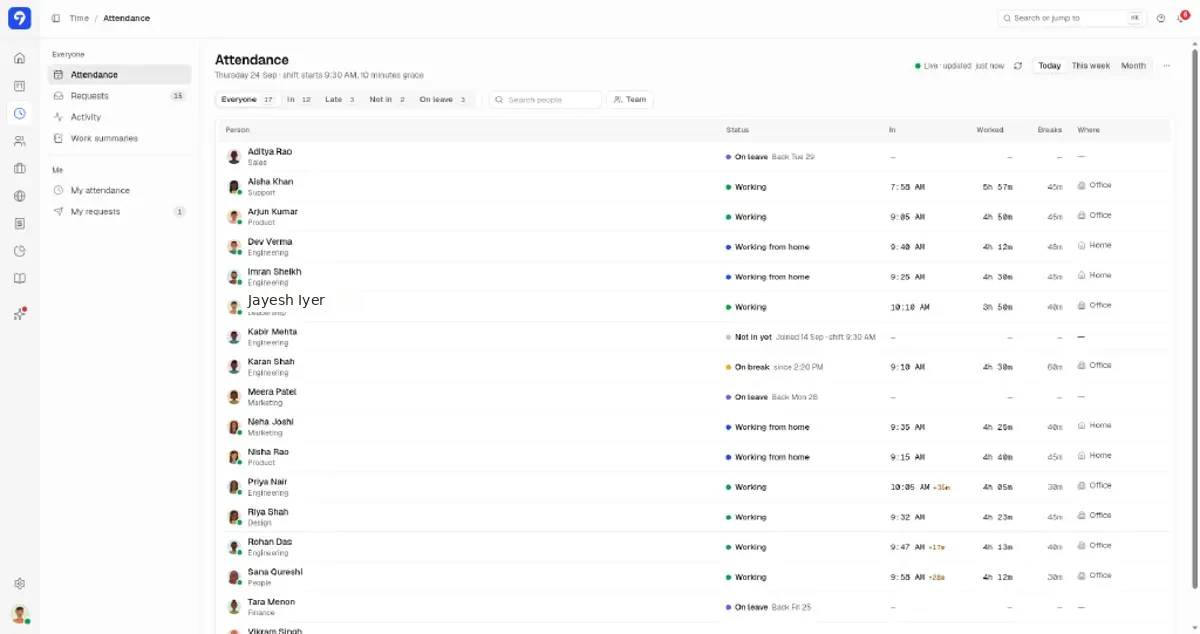
  2. Have remote staff clock in from desktop or web — Check-in records office or home, start time, and late minutes after grace. Managers see a live board of their team: who's in, on break, or not started yet.
  3. Enable optional screenshots and app usage — Turn on capture policies per team; nothing is mandatory by default. Employees can see what's recorded, and clients never get access unless you enable portal visibility.
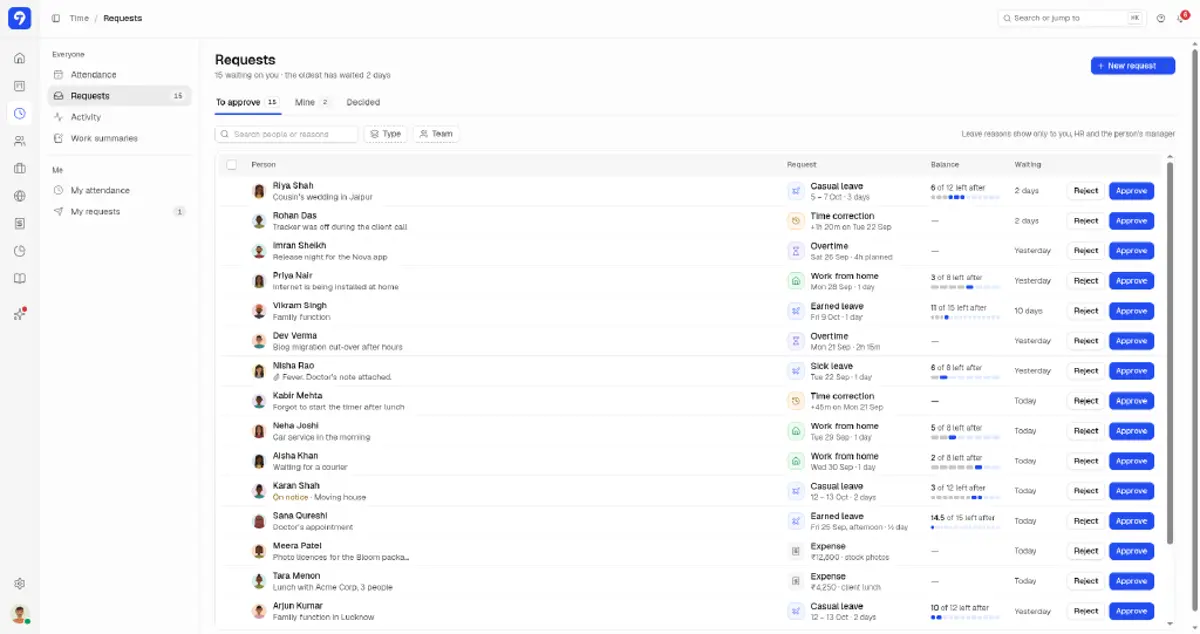
  4. Route WFH, leave, and corrections through Requests — WFH for a single day, casual leave, and time corrections sit in one approval queue with reasons visible to HR and managers only.
  5. Review utilization and activity reports — Use hours and activity reports to spot idle gaps or overloaded members. Billable project time stays tied to the same sessions attendance already validated.

What this looks like in Trakkar

Product screenshots (Acme Studio sample data) from the Trakkar web app itself, not from a separate HR or invoicing tool.

Trakkar attendance board showing shift start, late arrivals, WFH, and worked hours for the team
Live attendance with shifts, grace period, office vs home, and break time.
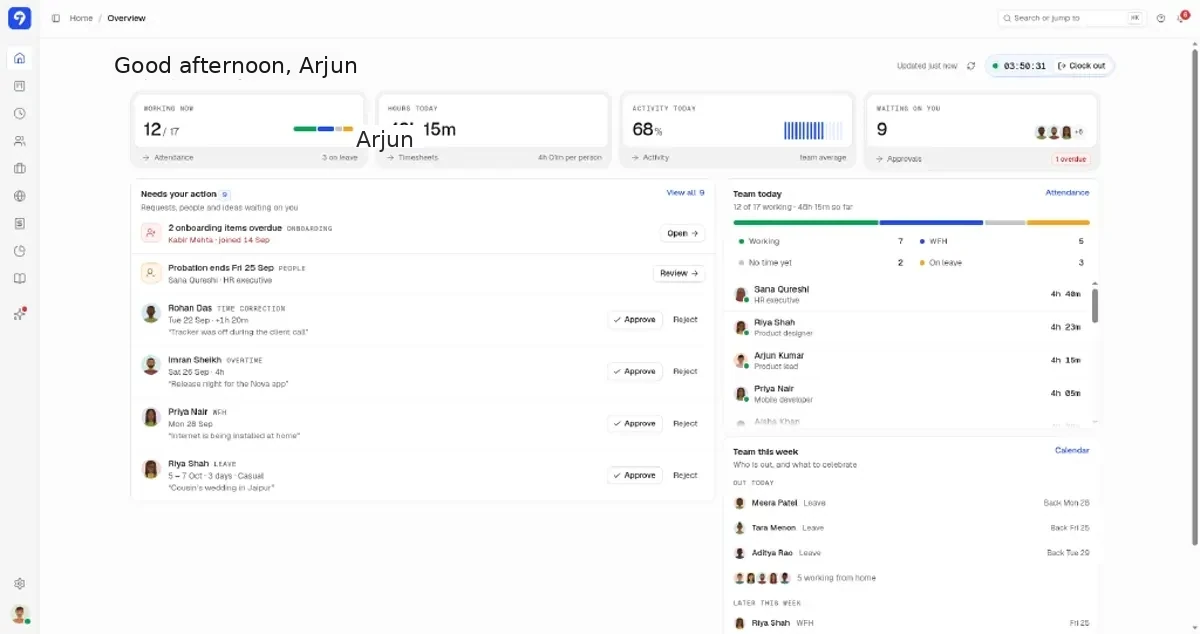
Trakkar manager home overview with attendance, hours today, and pending approvals for Acme Studio
One dashboard for who is working, hours logged, and what needs your approval.
Trakkar requests queue for leave, WFH, time corrections, and expenses awaiting approval
Leave, WFH, and corrections in one approval queue instead of scattered emails.
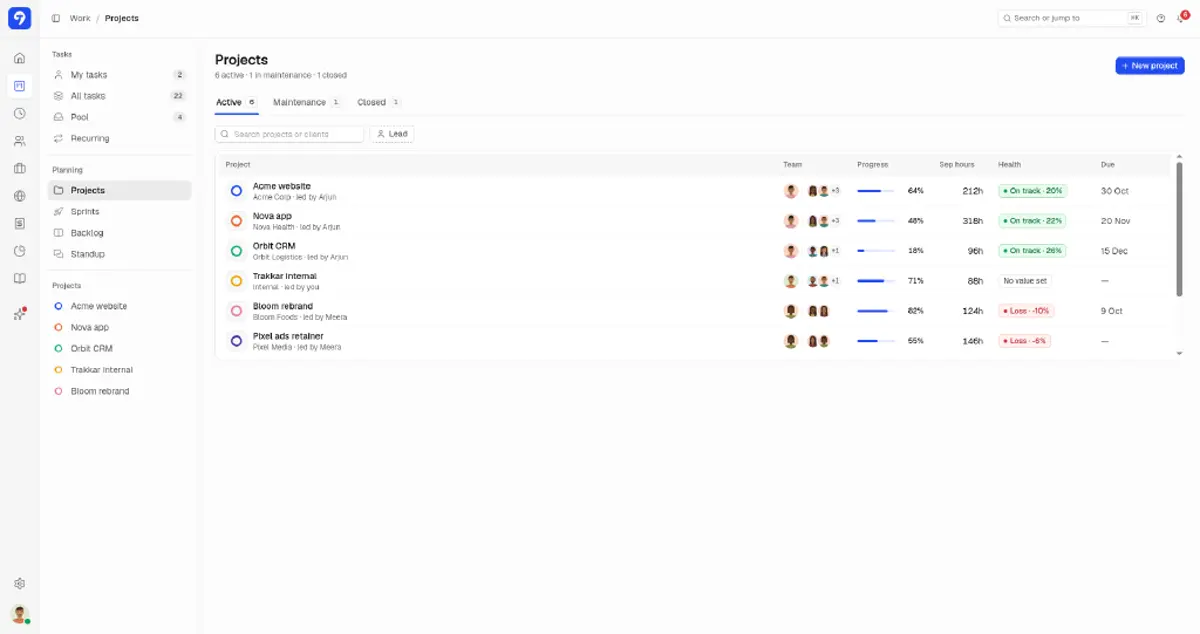
Trakkar projects list with progress, September hours, and health for client projects
Projects tied to clients, with hours and margin visible before you invoice.
Trust, not surveillance

Transparent monitoring policies

Trakkar is built for agencies that need proof of delivery, not keystroke theater. Screenshots are optional, configurable per user, and visible to the employee. Pair them with project time and standup summaries so managers coach instead of chase.

  • Live attendance: in, late, on leave, WFH, on break
  • Optional screenshots with activity scores
  • WFH and leave requests with audit trail
  • Daily work summaries on clock-out
  • Client portal for progress, not raw surveillance feeds
INR stack savings

One price vs Hubstaff + HR + invoicing

Trakkar Team at ₹120/user includes monitoring, attendance, leave, projects, and GST invoicing. If you're paying for separate monitoring, HR, and invoicing tools today, compare on our Hubstaff and Time Doctor alternative pages.

Trakkar attendance board with office and work-from-home status
Trust

Trusted by growing teams

Compare

Evaluating tools you already pay for?

Alternative pages with INR pricing and an honest look at feature gaps.

More guides

Related problem-solving guides

Practical workflows for Indian agencies that bill clients for their time.

View all guides

Common questions

No. Screenshots are optional and configurable per user or team. Many agencies use attendance plus project time only; others add screenshots for client-facing delivery teams.

Try Trakkar now.

Start Free TrialBook a demo
No credit card required. Cancel anytime.