One plan, everything included·Premium ₹120/user/month·Pay upfront for 6 months (5% off) or 12 (10% off)
Time tracking · India
Trakkar logo

Employee Time Tracking Software for India: Time, Attendance and Projects in One Tool

If you run a service business, the time tracking software you pick in India should do three things. Track hours, keep attendance and leave in the same place, and bill you in rupees. Trakkar does all three. It costs ₹120 per user per month plus GST, billed in INR, with unlimited projects and a free trial that needs no credit card.

Time · attendance · leave · projects · ₹120/user/month + GST

If all you need is a simple timer, a free tool may be enough. But if you run an agency, a consultancy or any team that works on client projects, and you are comparing employee time tracking software in India, read on. This page covers what to look for, how Trakkar works, what it costs, and how it compares with the tools Indian business owners shortlist most.

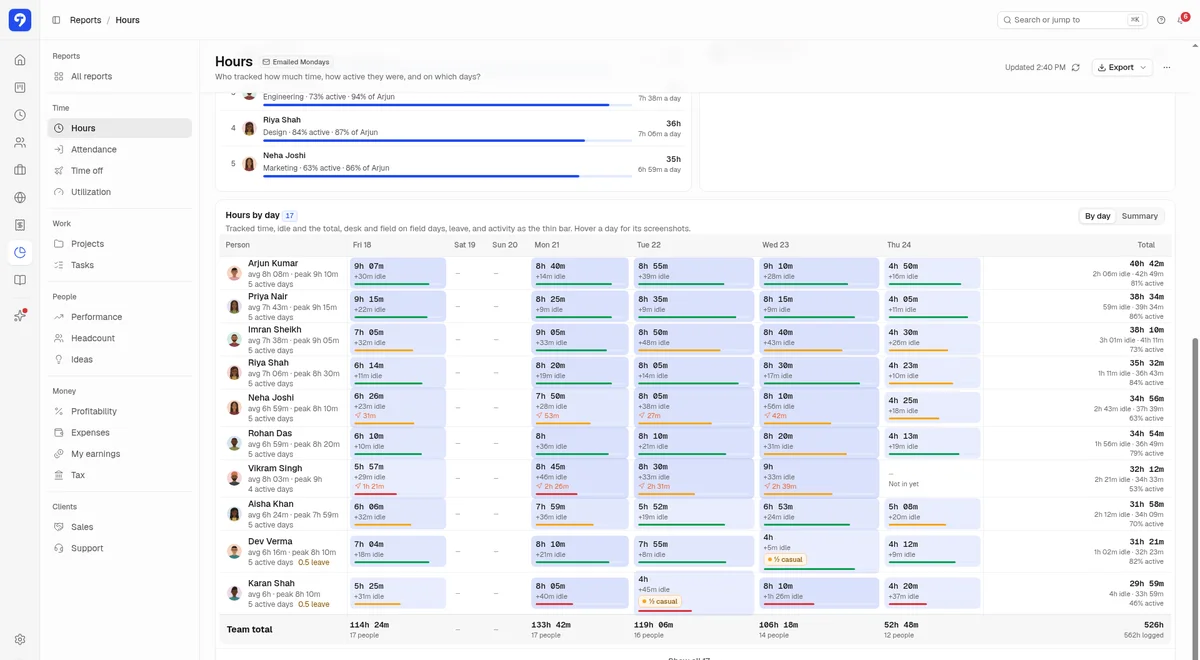
Trakkar Hours report showing one week of tracked hours and idle time by person and day

What Indian businesses need from employee time tracking software

Most time tracking tools were built for teams in the US or Europe. They work fine in India. But a few things matter more here.

  • Pricing in rupees. USD prices move with the exchange rate, and your card may add a forex charge on top. A rupee price is easier to budget for.
  • Attendance and leave as well as hours. Indian teams run on shifts, grace periods, half days, WFH requests and a long list of holidays. When attendance lives in one tool and hours in another, someone ends up reconciling spreadsheets every month.
  • Projects and timesheets together. A service business needs to see hours by client and by project, not only by person.
  • Monitoring your team can trust. Screenshots can help with remote work, but only when people know what is captured and why.
  • Simple payment. You pay in INR through Razorpay, an Indian checkout, so billing stays simple.

Before you compare tools, decide what you need one for most. Is it payroll, client projects or productivity? That answer cuts the list down fast.

How Trakkar handles time tracking

Trakkar's desktop app tracks time automatically once your team starts work. It runs on Windows and macOS. There is more detail on our page about desktop time tracking with screenshots.

Here is what you get:

  • Automatic tracking. One click to start. Trakkar logs the hours and flags idle minutes, so nobody has to rebuild a timesheet from memory.
  • Idle time handled fairly. Your team decides whether to keep or discard idle time, so the record stays honest.
  • Manual entries and time corrections. Forgot to start the timer? Add a manual entry. Managers approve time corrections in Time > Requests.
  • Screenshots, if you want them. They are optional. Admins set them per person, choose how often they are taken, and can blur them. By default, each person can see their own screenshots and app activity.
  • App and website usage. See which apps and sites take up the day. App tracking works in the desktop app.
  • If your connection drops. Trakkar keeps your timer running and syncs your time once you're back online. Screenshots pause while you're offline.
  • Timesheets and reports. Clean timesheets by person, project and day, ready to export.

Attendance, leave and Indian holiday calendars

Time tracking tells you what people worked on. Attendance tells you who showed up, when, and from where. Trakkar keeps both in one place.

  • Clock in and out from the web or a phone, with typed breaks.
  • Office or remote. Location is recorded, so you can tell office days from home days.
  • Shifts and grace periods. Create shift templates, assign them, and set a grace period for late arrivals.
  • Holiday calendar. Set up your company holidays for the year, including the Indian national and festival holidays your business observes.
  • Leave types and balances. Create the leave types you actually use, such as casual, sick and earned leave, with balances and accruals.
  • WFH and overtime requests. A team member raises a request and a manager approves it.
  • One approval queue. Leave, WFH and attendance corrections sit together, not scattered across emails and WhatsApp messages.
  • Team heatmap. See the whole team's attendance at a glance. Admin edits are logged.
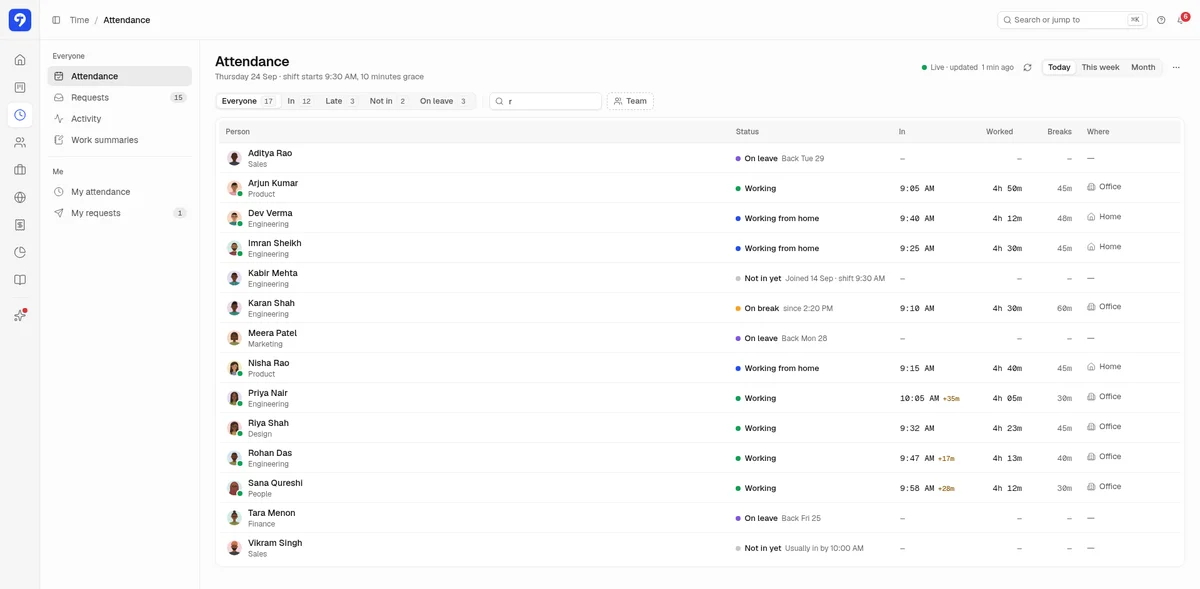
Trakkar attendance view showing today's clock-ins, shift start with a 10 minute grace period, office or home and break time
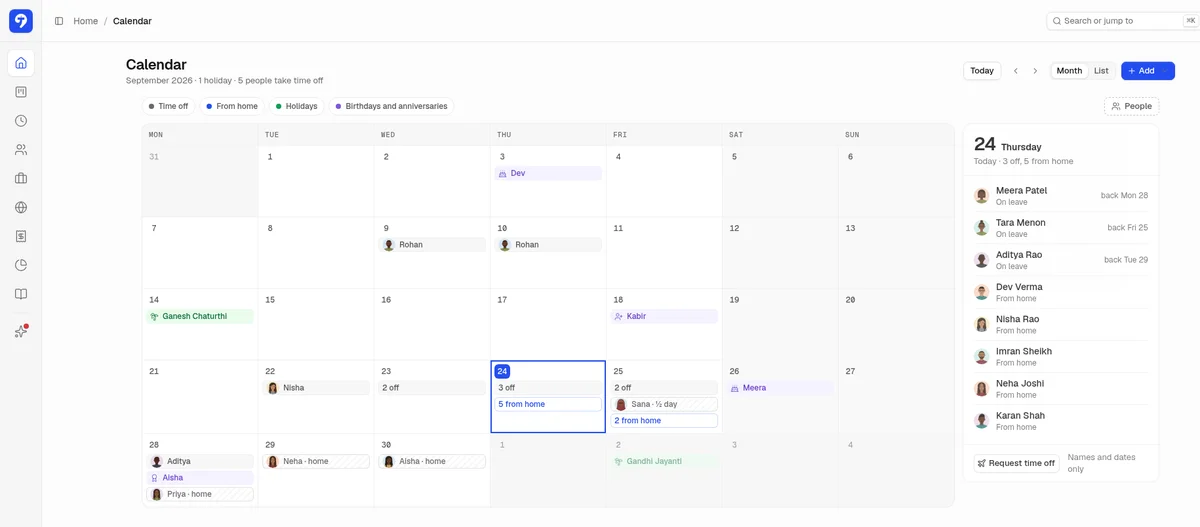
Trakkar leave and holiday calendar showing Indian public holidays such as Ganesh Chaturthi and Gandhi Jayanti, plus leave and work from home days

Projects and timesheets in the same place

For a service business, hours only mean something when they sit against a client and a project. So project and task management comes in the same plan.

  • Unlimited projects and team members.
  • Tasks with checklists, attachments and comments.
  • Kanban board, Gantt view and custom workflow statuses.
  • Daily standups and work summaries on clock-out.
  • Project reports and member workload.

Time, attendance and projects share one login. Nobody has to match names across three exports at month end. The same plan also includes invoicing, quotations and a client portal, with GST and GSTIN support for Indian businesses.

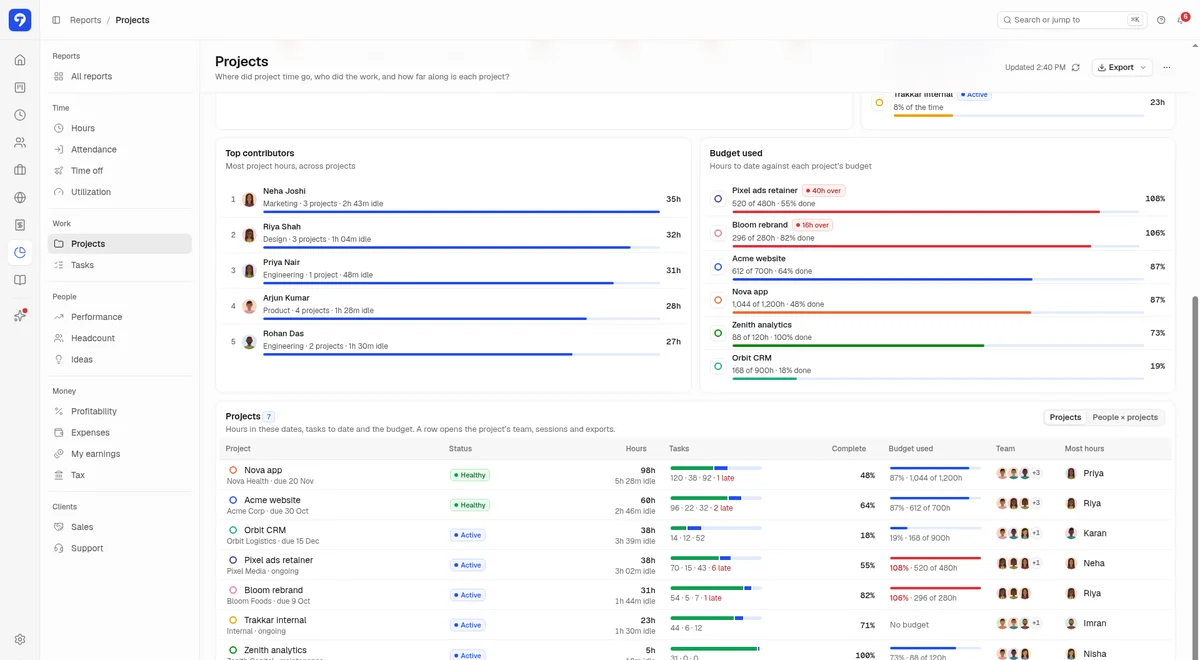
Trakkar projects report showing projects with tasks, hours logged and budget used

Trakkar pricing in India (INR)

Trakkar has one plan, Premium, with all features. Prices exclude tax, and GST is added at checkout for customers in India.

Premium plan: ₹120 per user per month + GST

Billed in INR and paid upfront, once, for 6 months (5% off, ₹114/user/month + GST) or 12 months (10% off, ₹108/user/month + GST). There is no monthly billing. For example, 10 users for 6 months is ₹6,840 + GST, paid once. Pay through Razorpay's secure checkout. Premium includes:

  • Unlimited projects and team members
  • Time tracking, with time corrections approved in Time > Requests
  • Screenshot monitoring and app usage analytics
  • Attendance, shifts, leave and holiday calendar
  • Invoicing, quotations and client portal
  • Reports and role permissions

You can add users at any time. New seats added mid-term are a one-time charge at the ₹120/user/month list rate, prorated for the days left in your 6- or 12-month term.

What a 10 or 25 person team pays

Team sizeList price per month (before GST)6 months upfront, 5% off (before GST)
5 users₹600₹3,420
10 users₹1,200₹6,840
25 users₹3,000₹17,100
50 users₹6,000₹34,200

Premium starts with a 14-day free trial, and you do not need a credit card to sign up.

Start free trial

Trakkar vs popular time tracking software in India

These are the tools Indian buying guides name often for this search. To pick them, we counted mentions in seven Indian listicles and in the live search results for both queries. We checked each one on its own website in October 2026. Prices change, so please confirm on vendor site before you decide. Where we could not confirm a fact on the vendor's site, the table says so.

CapabilityTrakkarHubstaffTime DoctorClockifyJibbleZoho People
Listed price₹120/user/month + GST (one plan, all features)$4.99 to $25 per seat/month, billed annually (USD). Confirm on vendor siteNot confirmed (USD; paid plans Basic, Standard, Premium). Confirm on vendor siteFree up to 5 users; paid from $5.49 per seat/month billed annually (USD), Standard plan. Confirm on vendor siteFree plan for unlimited users; paid plans Not confirmed. Confirm on vendor siteINR pricing offered on site; amounts Not confirmed. Confirm on vendor site
Billed in INRYesNot confirmedNot confirmedNot confirmedNot confirmedYes (INR option on pricing page)
Free trialYes, no card14 days, no card2 weeks of Premium7 days of Pro featuresFree plan30 days
Automatic desktop trackingYesYesYesYes (timer and auto tracker)Desktop app: yes. Automatic tracking: Not confirmedNot confirmed
Optional screenshotsYes, set per personYesYesNot confirmedYesNot confirmed
Attendance and shiftsYesYesYes (Standard)Attendance: yes (Standard). Scheduling: Pro planYesYes (higher tiers)
Leave and holiday calendarYesYes (time off and holidays)Leave tracking yes (Standard); holiday calendar Not confirmedYes (Standard)Time off yes; holiday calendar Not confirmedLeave yes; holiday calendar Not confirmed
Projects and tasksYes (Kanban, Gantt)YesYesYesYes (project time)Timesheets yes; project tools Not confirmed
InvoicingYes, with GST and GSTIN supportYesNot confirmedYes (Standard)YesNot confirmed
Good fit forIndian service businesses that want time, attendance, leave and projects in one INR planRemote and field teams that want deep monitoring and GPSRemote and hybrid teams that want detailed productivity analyticsBudget teams that want a free or low-cost timerTeams that want free clock-in and attendance with face recognition or GPSCompanies already on Zoho that want HR with attendance and timesheets

How to choose the right tool for your team

No one tool suits every Indian business. Start from your main need.

  • You need payroll with statutory deductions. Look at an HR and payroll suite such as Keka or greytHR. That is what they are built for. Trakkar is not a payroll tool.
  • You only need a basic timer for a few people. A free plan from Clockify or Jibble may be all you need.
  • You need deep monitoring for a large remote or hybrid team. Hubstaff and Time Doctor focus heavily on activity analytics.
  • You run a service business and want time, attendance, leave and projects together, priced in rupees. That is the team we built Trakkar for.

A few practical checks before you buy:

  1. Work out the real monthly cost in rupees, including GST and any forex charge on USD plans.
  2. Check whether attendance and leave are included or sold as a higher tier.
  3. Ask whether screenshots are optional and whether employees can see their own.
  4. Run a free trial with a small team for a week or two before you roll it out to everyone.
Trust

Trusted by growing teams

More

Related pages

Other high-intent guides for Indian teams.

Frequently asked questions

It depends on what you need. For payroll-led HR, an Indian HRMS is usually the right fit. For a free basic timer, Clockify or Jibble can work. If you run a service business and want time tracking, attendance, leave and projects in one tool billed in rupees, Trakkar is a strong option at ₹120 per user per month plus GST.

Try Trakkar with your team

Track time, attendance, leave and projects in one place, priced in rupees. Set it up in minutes.

Start Free TrialBook a demo
No credit card required. No charge until you choose a paid plan.